Calorie Deficit Calculator7.6.7
Publisher Description


AI calorie counter & food diary. Track calorie deficit, macros and weight loss
Lose weight with an AI calorie counter, food tracker and calorie deficit tracker in one simple app. Snap a photo of your meal and let AI estimate the calories, or use the barcode scanner and food database to log food in seconds. Track calories, macros and weight loss progress - and see exactly how your daily food choices shape your long-term results.
Key Features
AI Calorie Counter & Food Scanner - Take a photo of your food and the AI calorie tracker estimates calories and macros instantly. Log meals in seconds - no more manual guesswork or tedious logging.
Barcode Scanner - Scan packaged foods with the barcode scanner to pull nutrition info straight into your food log.
Food Diary & Food Log - Keep a daily food journal for breakfast, lunch, dinner and snacks. Save frequent meals so your food diary gets faster every day.
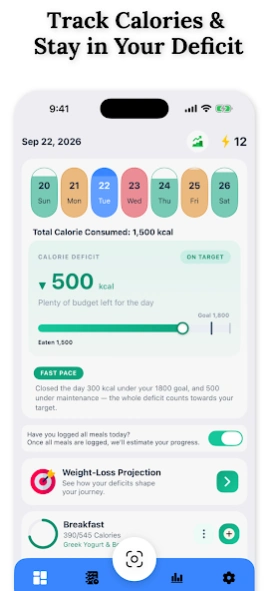
Calorie Deficit Calculator & Tracker - The calorie calculator sets your daily target, and the calorie deficit tracker compares it with your intake so you always know if you are on track to lose weight.
Macro & Protein Tracker - Track protein, carbs and fat alongside calories. The macro tracker and nutrition tracker show exactly what your diet looks like each day.
Weight Tracker & Goal Tracking - Log your weight, set weight loss goals and follow your progress with clear milestones, projections and visual feedback along the way.
Progress - Insights Trends, statistics and charts help you understand your eating habits over time - turning daily logs into a clear picture of your progress.
Free Features
• Calorie deficit tracker
• Food diary with barcode scanner
• Macros and micronutrient tracking (carbs, protein, fat, fibre, sugar, sodium)
• AI food search — describe any food in words (10 free)
• Exercise and activity tracker (400+ activities)
• Step tracker
• Water tracker
• Weight tracker and body measurements
• Smart meal reminders
Why This Calorie Deficit App?
Most calorie counting apps only show numbers. This calorie counter connects your daily logs with long-term weight loss projections, so you can see the bigger picture. Whether you are counting calories, tracking macros, keeping a food diary or simply becoming more aware of your nutrition, this app keeps you informed and motivated.
Who Is It For?
Weight loss - stay in a calorie deficit with clear daily targets
Healthy eating - use the food tracker and food journal to build better habits
Muscle & fitness - hit your goals with the macro and protein tracker
Diet awareness - a simple diet tracker for anyone who wants to understand their food intake
Simple, clean and easy to use - a calorie tracker app built for consistency, not complexity.
Important: This app is intended for informational and educational purposes only and does not provide medical advice, diagnosis, or treatment. Calorie estimates, weight projections, and other insights are based on user-provided information and mathematical calculations and may not reflect actual results.
Always consult a qualified healthcare professional before making significant changes to your diet, nutrition, exercise routine, or weight-management plan. Never disregard professional medical advice or delay seeking it because of information provided by this app.
Individual results may vary. This app is not a substitute for professional medical guidance.
About Calorie Deficit Calculator
The company that develops Calorie Deficit Calculator is Jeet Fitness Apps. The latest version released by its developer is 7.6.7.
To install Calorie Deficit Calculator on your Android device, just click the green Continue To App button above to start the installation process. The app is listed on our website since 2026-10-09 and was downloaded 44 times. We have already checked if the download link is safe, however for your own protection we recommend that you scan the downloaded app with your antivirus. Your antivirus may detect the Calorie Deficit Calculator as malware as malware if the download link to com.jeet.diety is broken.
How to install Calorie Deficit Calculator on your Android device:
- Click on the Continue To App button on our website. This will redirect you to Google Play.
- Once the Calorie Deficit Calculator is shown in the Google Play listing of your Android device, you can start its download and installation. Tap on the Install button located below the search bar and to the right of the app icon.
- A pop-up window with the permissions required by Calorie Deficit Calculator will be shown. Click on Accept to continue the process.
- Calorie Deficit Calculator will be downloaded onto your device, displaying a progress. Once the download completes, the installation will start and you'll get a notification after the installation is finished.
Program Details
System requirements
Download information
Pricing
Version History
version 7.6.7
posted on 2026-10-09
Bug fixes and performance improvements
version 7.6.2
posted on 2026-10-03
- Image loading issues fixed
version 7.5.1
posted on 2026-09-19
- Bug & localsations issue fixed
version 7.3.2
posted on 2026-08-10
Bug fixes and Italian localisation added
version 7.1.0
posted on 2026-07-16
Crash & Bug Fixes
version 7.0.5
posted on 2026-07-11
Crash & Bug Fixes,
New Onboarding flow
version 6.8.3
posted on 2026-06-29
Crash Fixes
version 6.7.9
posted on 2026-06-14
Bug fixes and performance improved
version 6.7.1
posted on 2025-10-27
version 6.5.4
posted on 2025-09-02
Bug fixes
